Every line, named
You know who did what
Every change is tagged with the agent that made it and the prompt it was given. Nothing goes into your commit on a guess.
How every line is named →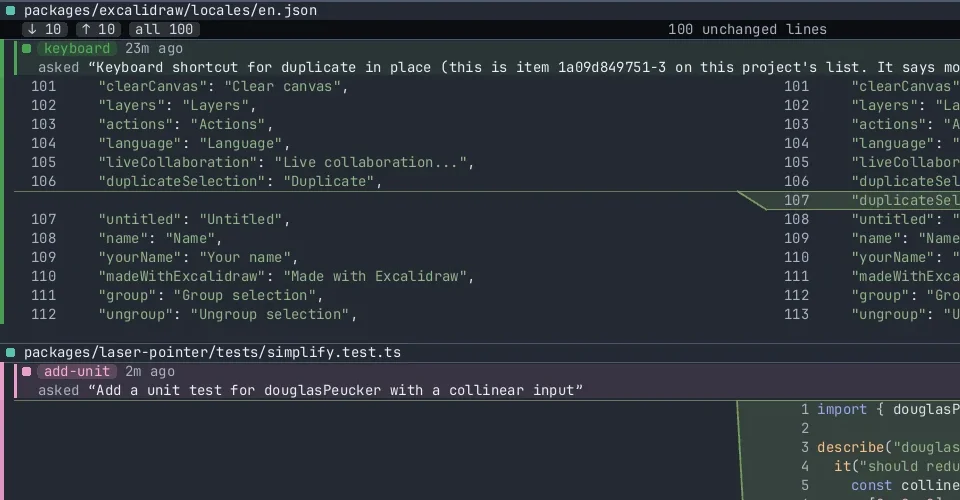
A workspace for coding with agents
Run the coding agents you already use, in the repo you already have. Every line is tagged with the agent that wrote it, so several agents can share one checkout and you can still see, and commit, exactly whose work is whose.
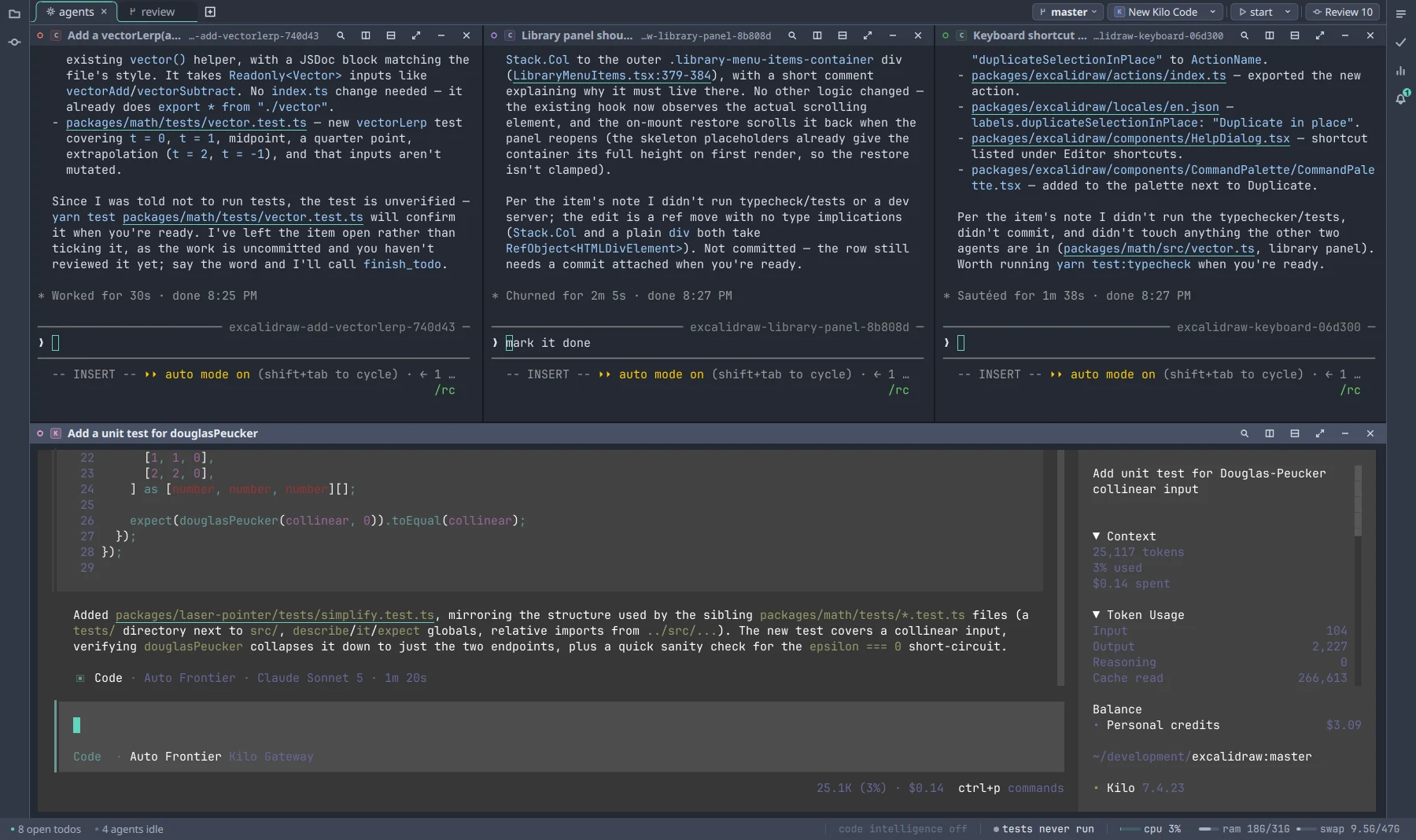
Runs the agents you already use Claude CodeCodexGemini CLICopilot CLI GrokOpenCodeKilo Code
Every change is tagged with the agent that made it and the prompt it was given. Nothing goes into your commit on a guess.
How every line is named →
Read what the agents did and make the small fix yourself. Keep your IDE; this sits next to it.
See the editor →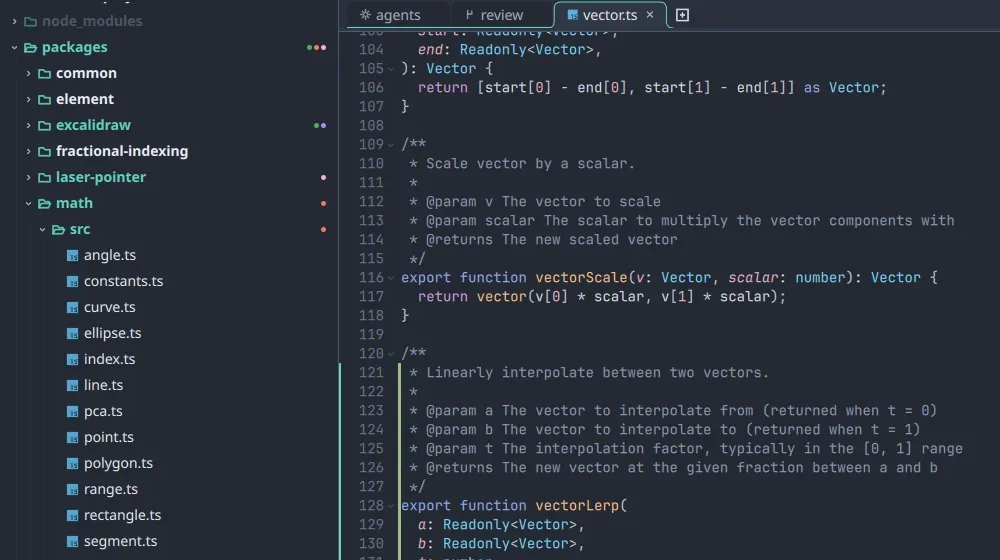
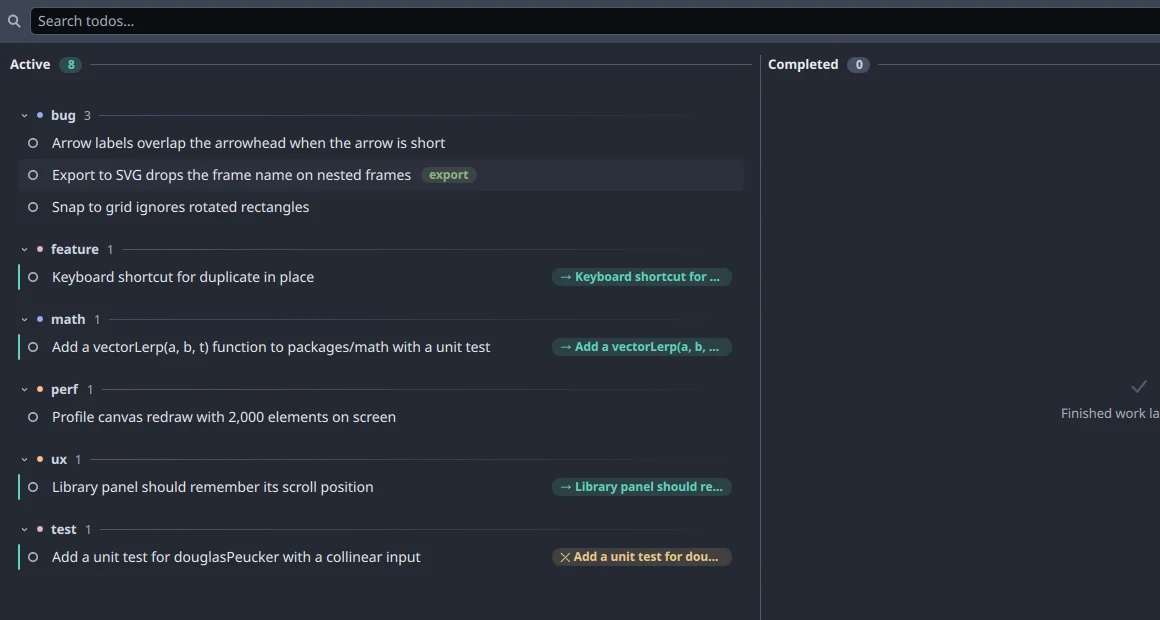
Type #bug in a todo and it files itself. Hand it to any agent, from any
vendor, and it starts. When it's done, the todo is checked off with its commits attached.
Git stages by hunk, so two agents' edits next to each other become one change. Parity tracks each line instead, keeps track through formatters, moves and renames, and won't guess when it isn't sure.
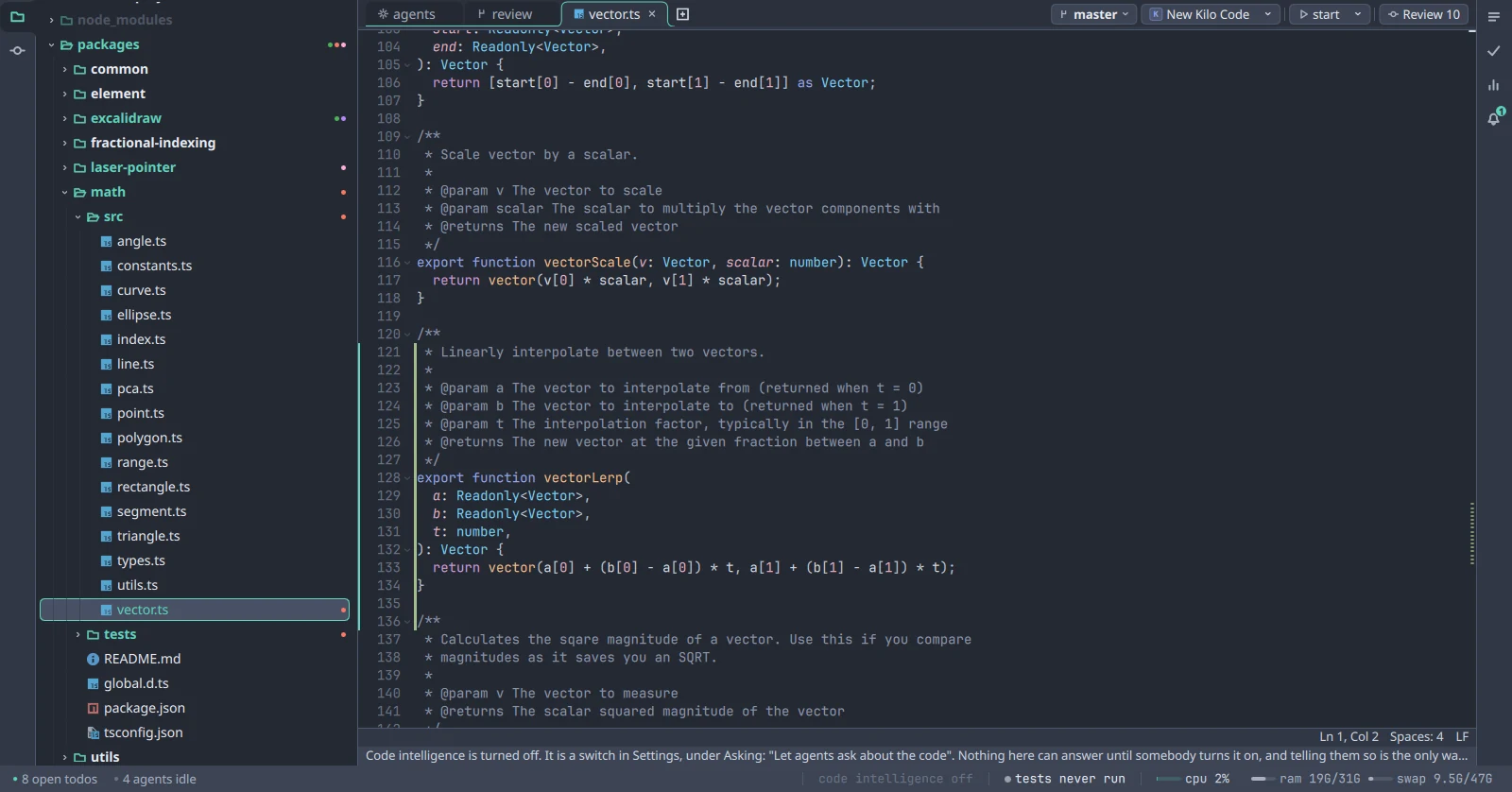
Click a file path in an agent's output and the file opens at that line, with change bars in the gutter and full language support. The diff is one key away.
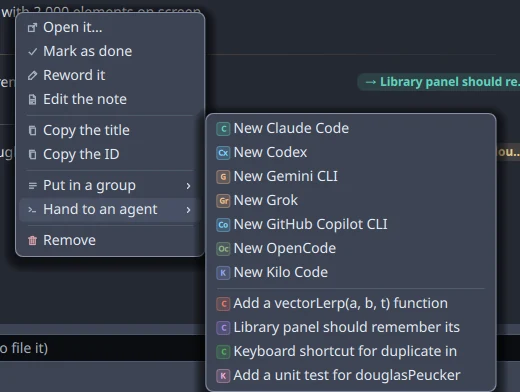
Type #bug or #perf in a todo and it files itself. Pick an
agent from the menu and it starts. When it's done, the todo is checked off with its
commits attached, so your list doubles as the change history.
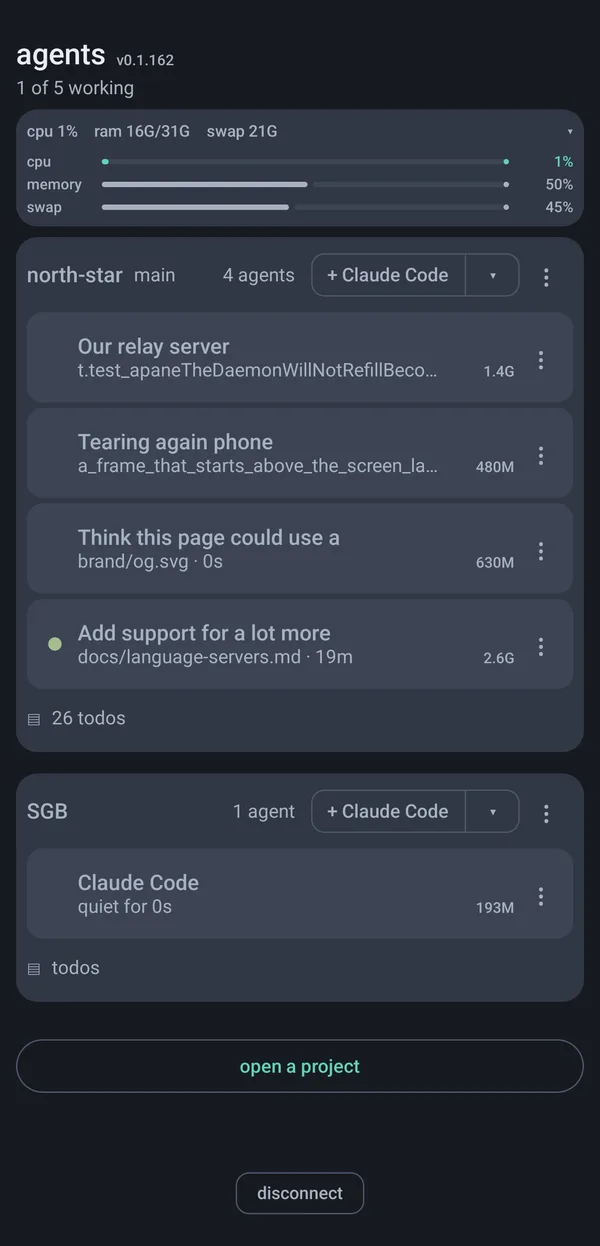
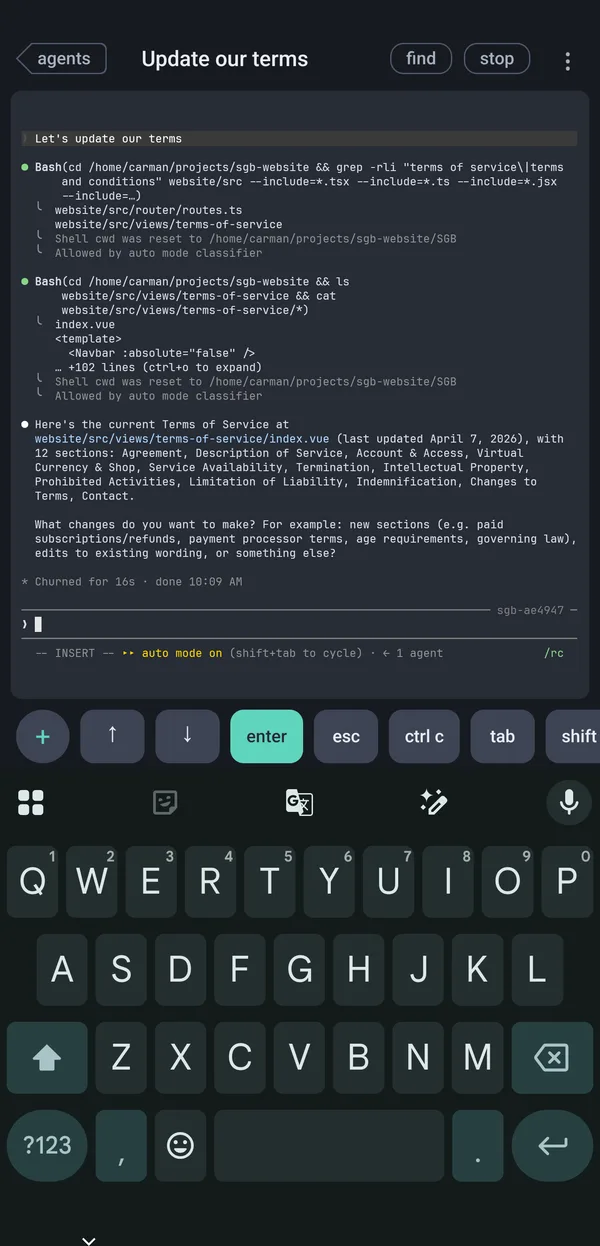
The real terminal of every agent, not a chat summary, over an encrypted link to your own machine. Pair once with a QR code and skip the SSH and VPN setup. See which agent is waiting on you and answer it from anywhere.
App Store coming soon Google Play coming soon
Code Carta runs on your machine, and your code stays there.
Bug reports include your logs, and they're only sent if you choose to. The full policy is one page.
No account needed, and your code stays on your machine.
The engine
Parity knows who wrote every line. That's what lets several agents share one checkout without anyone's work ending up in the wrong commit.
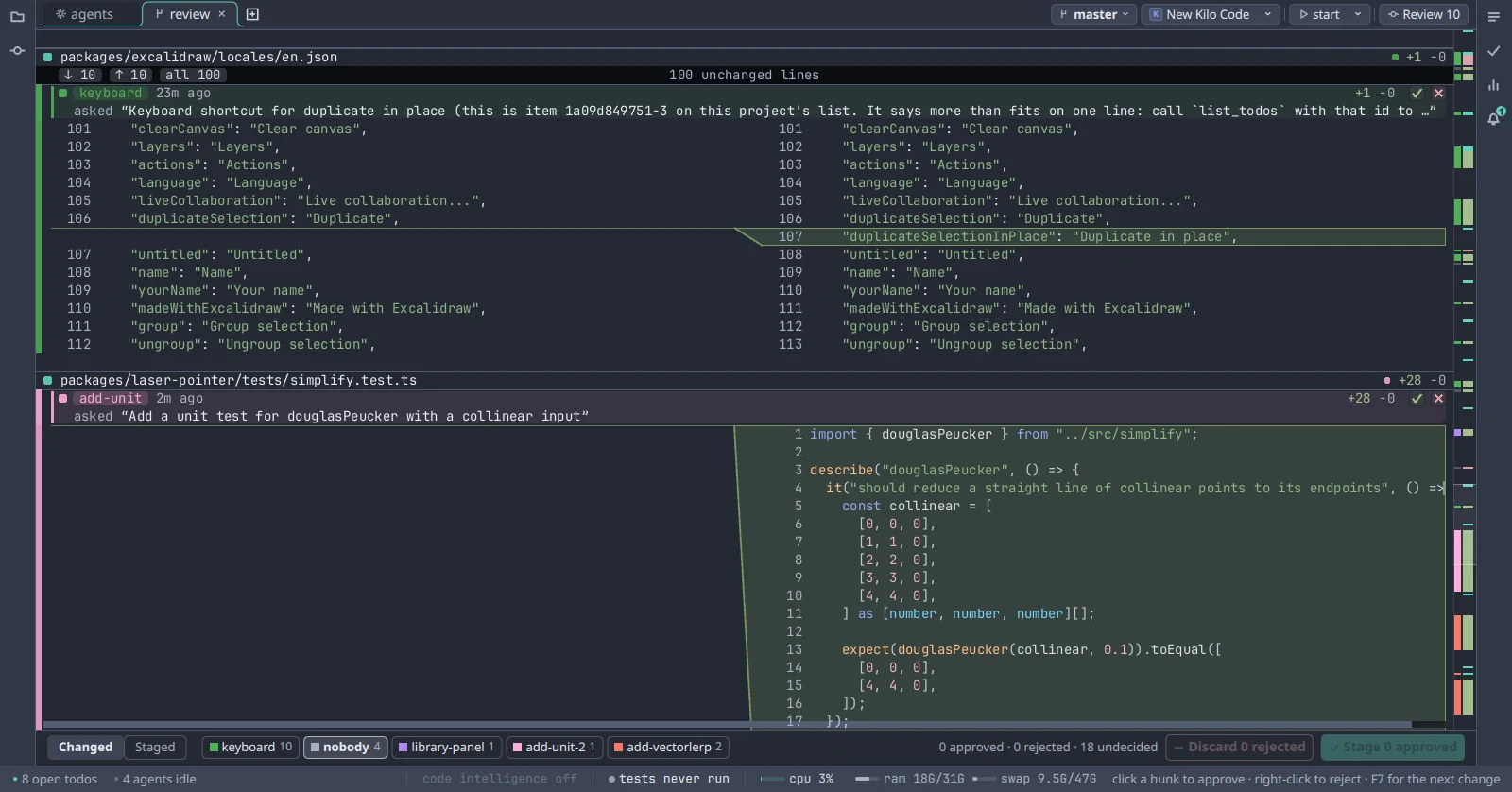
Git stages by hunk, so two agents' edits next to each other become one change. Parity tracks each line instead.
Run a formatter, move a function, rename a file, or close the agent that wrote it. Every line still knows who wrote it.
A wrong guess puts someone else's half-finished work into your commit, and you find out when the build breaks. Asking costs you one decision. So when parity can't prove who wrote a line, it holds that line back and tells you why, before you commit.
Commit from Code Carta and you take your own lines, not everyone else's in the file.
Reformatting doesn't move authorship to whoever ran it.
Close an agent mid-task and its uncommitted lines are still there, still named, yours to keep or drop.
When another agent edits a file you're in, you get its name.
Unit tests only catch the mistakes someone already thought of. So parity is also checked continuously against real repositories.
Pricing
Code Carta isn't in your model calls, so there are no token charges or per-agent seats. You pay for phone access, for teams, and for the controls a company needs.
At work or at home, with no account.
For one person.
Choose how many seats at checkout.
Invoiced, on terms that suit you.
In early access. Paid plans go on sale at launch. Every download today is the Free plan. Pro has a founding price for the first year after launch, $79 a year, kept for as long as you keep the plan.
Prices in US dollars. Tax is added at checkout where it applies. Payment, tax and invoices are handled by our merchant of record, Paddle. Cancel at any time.
Every build is on the download page, with its checksum.
An installer that needs no administrator, or a zip that writes nothing outside its own folder.
Everything beside the binary. One script adds a desktop entry, per user by default.
The client already runs there. What remains is signing and notarisation.
Every agent's real terminal, on your phone. On the App Store and Google Play at launch.
Download
Free. Every agent, the whole parity engine, no account.
Windows and Linux first, macOS behind them. Leave an address and you get one message on the day, with the build for the machine you are on now. Nothing before it, and no list to be on afterwards.
Nothing phones home. The Free plan makes no network requests unless you press Install on a language server.
| Platform | Build | Size | SHA-256 |
|---|
To check a download, compare its row with what sha256sum <file> prints on Linux, or Get-FileHash <file> in PowerShell on Windows.
The client already runs there. What remains is signing and notarisation.
Ships with the Pro plan: every agent's real terminal on your phone. Answer the one that is blocked and add a todo from wherever you are.
App Store coming soonGoogle Play coming soon
Docs
Seven things you would not find by clicking around. Nothing else needs a page.
Tasks Todos What agents can ask Code intelligence The phone Licensing a computer Where things are
The play chip in the band, named for the task it will run. Its menu lists what the project already defines. Press one and it runs in a pane, like an agent. With nothing to run it says Add a task.
justfile, package.json scripts, Cargo.toml, and .PHONY targets in a Makefile.build, test, check, and run only. Never fmt or clean.just? The chip says "Install just" and links to it..code-carta/tasks.toml. Only run is required. Name a discovered id to rename it, pin it, or hide it.
[[task]]
id = "user:deploy"
label = "Deploy"
run = "just site"

[[task]]
id = "just:test"
pinned = true
Pinned tasks get their own button in the band. Pin from the chip's menu; it writes the same stanza for you.
#bug or #perf anywhere in the line. The word comes out of the title and becomes the group.Lives in .code-carta/todos.json in the project. Every window and the phone read the same file.
Registered with each agent on install. They are why an agent says "parity refused" instead of committing your colleague's work.
git blame cannot see.An agent that was handed a todo has its commits attached to it automatically.
A seat is one person on any number of their own computers. Offline, a plan keeps working for thirty days.
| Project list and tasks | .code-carta/ in the project. Commit it or ignore it; both work. |
|---|---|
| Settings | settings.json in Linux ~/.config/code-carta/, Windows %APPDATA%\code-carta\. Edits apply live. Every key is on the settings page. |
| Logs | Linux ~/.local/state/code-carta/. Windows %LOCALAPPDATA%\code-carta\. |
| Report a bug | Help › Report a bug. Sends the logs with your words. Kept thirty days. |
| Crash on start | Run once with CARTA_DEBUG=1 and send what it printed. |
Support
Email support@codecarta.com. We answer within two business days, and security reports within one.
On the desktop, open Help, then Report a bug. On the phone, use Send a screen report. Either one attaches your logs and shows you what's in them before you send. Reports are deleted after thirty days.
By email, include:
~/.local/state/code-carta/ on Linux or %LOCALAPPDATA%\code-carta\ on Windows.Crashes on start? Run it once with CARTA_DEBUG=1 set and send what it prints.
Email with Feature in the subject. Describe the moment you reached for something that wasn't there. Every request gets an answer, including whether it's planned.
Email with Security in the subject and we'll reply within one business day. We won't take action against good-faith research, we'll credit you if you'd like, and we'll tell you when the fix ships. If you catch the app sending anything our privacy policy doesn't list, that's exactly the report we want.
Sign in on the account page to see your seats and codes. To cancel, or with a question about a charge, email from the address on the account. Refunds: fourteen days on any payment, no reason needed.
A paid plan keeps working for thirty days without reaching us, then falls back to Free until it can.
It tells you why, by file and by agent. How parity works.
About
Version control assumes every change belongs to a person who knows which change is theirs. Running several coding agents at once breaks that.
I built Code Carta to solve a problem I had myself. I've always been a Vim and tmux user, and I wanted to take my personal workflows to the next level. I don't like using git workflows all of the time, and I hate it when several agents step on each other and get in each other's way.
So one thing led to another, the rabbit hole got deeper and deeper, and I ended up with Code Carta.
It staged the files it had touched. Those files also held another agent's half-finished tests. It pushed a branch that didn't build.
Nobody was careless. git add takes whole files, and there's no way to ask for less. Other tools solve this by giving each agent its own copy of the repo and leaving you the merge. We made the unit smaller instead: the line. That's parity.
The worry isn't that agents write bad code. It's that the code stops being yours: you didn't write it, you didn't watch the tests, and a month later you can't say why it works the way it does. It has a name now.
Most tools answer with more autonomy. We keep you in the loop: every line tagged with the agent and prompt behind it, every test run visible as it happens, and every commit linked to the todo it came from.
Pinning work on the wrong author is the mistake that costs people an afternoon.
Use a separate copy when the work needs one, not just to run two agents on two bugs.
Every number on this site is a measurement, not a projection.
Terms of service
Code Carta is made and sold by CJB Software LLC. Downloading, installing or paying for it means you agree to these terms. They are written to be read, and they say what the rest of this site says.
5 October 2026
Code Carta is desktop software, with a companion phone app, that runs on your own machines. We licence it to you; we do not sell it to you, and we do not host it for you. Your code, your prompts and your agents' output stay on your computers. We have no copy of them.
Code Carta works alongside coding agents you obtain and pay for separately. We do not provide, resell or meter access to any AI model or agent. Your agreements with those providers are yours, and their traffic passes between you and them, not through us.
The Free plan is free for as long as you like, for any use, personal or commercial. It needs no account and no licence. It runs as many agents as you like and includes the whole parity engine, the review, the test observer, todos, the editor and one-click language server installs.
Pro, Teams, Enterprise and Founding plans unlock the features listed on the pricing page for the number of seats you have paid for. One seat is one person. A seat is claimed by entering a claim code into the desktop app on that person's machine; you may reassign a seat by removing its holder from your account, which revokes their licence.
A paid licence is a signed token that the software verifies on your machine. To keep it current the software contacts our service about once a day, sending the token and nothing else. If it cannot reach us, your plan continues to work for up to 30 days from the last successful check, after which the software returns to the Free plan until it can. When a plan ends (cancelled at the end of its period, refunded, or a seat taken back), the software returns to the Free plan at its next check.
On a Teams or Enterprise plan, the todo list you share is kept on our service, or on a server you run yourself if your plan includes one. What is on it is yours; we hold it only to pass it between your seats. Enterprise plans are sold by agreement and invoiced; where that agreement and these terms differ, the agreement applies.
You may not copy, modify, reverse engineer or redistribute the software except where the law lets you regardless of this clause. You may not share one seat between several people, forge or tamper with a licence token, or try to get around a plan limit. You may not use the software to do anything unlawful.
Paid plans are sold through our merchant of record, Paddle.com Market Ltd, which is the seller of record for your purchase, handles payment, tax and invoicing, and whose buyer terms also apply. We never see your card details.
Subscriptions renew automatically at the interval shown at checkout until you cancel. You can cancel at any time from Manage billing on your account page; cancellation takes effect at the end of the paid period and you keep your plan until then. Prices may change; we will tell you at least 30 days before a change affects a renewal. The Founding price is held for as long as you keep that plan, as the pricing page says.
Refunds are covered by our refund policy.
A paid plan creates an account for the email used at checkout. Sign-in is by a link sent to that email; there is no password. You are responsible for keeping that mailbox secure and for what is done from your account. Tell us at once if you think it has been used without your permission.
The software runs without our service. Our service exists to issue and refresh licences, to relay encrypted phone sessions, and to serve the account page and downloads. We work to keep it up but do not promise uninterrupted availability, and an outage of it does not stop the software running.
The software is provided as is. To the fullest extent the law allows, we disclaim all warranties, express or implied, including fitness for a particular purpose and non-infringement. Code Carta records which agent changed which line; it does not decide whether those changes are correct, and reviewing them remains your responsibility.
To the fullest extent the law allows, CJB Software LLC is not liable for indirect, incidental, special or consequential damages, or for lost data, lost profits or lost work, arising from the software or these terms. Our total liability for any claim is limited to the amount you paid us in the twelve months before the claim. Some places do not allow these limits, in which case they apply as far as they can.
You can stop using the software at any time and delete it. We can end your licence if you break these terms. Refunds follow our refund policy. Sections 8 to 12 survive the end of the agreement.
We may update these terms. The date at the top says when. If a change matters to a paid plan we will email the account before it takes effect. Continuing to use the software after a change means you accept it.
These terms are governed by the laws of the State of Texas and of the United States, without regard to conflict-of-law rules. Nothing here takes away rights you have as a consumer under the law where you live.
Code Carta is made by CJB Software LLC. Questions about these terms go to support@codecarta.com.
Privacy policy
This page lists every way Code Carta or this site can come to hold something about you. It is short because the list is short.
6 October 2026
On the Free plan: nothing about you. It has no account and contains no analytics, telemetry or crash reporting. Logs are files on your disk. It makes two kinds of request to us. The download below, when you ask for it. And an update check: when you bring its window to the front, at most once every six hours, it asks codecarta.com for the newest version number. That request carries nothing, not your version, not an id, not your plan; we learn only that some install asked, and all we keep of it is a count of how many asked each day. It has a switch on the About card.
On a paid plan: a licence check about once a day. The request carries your licence token, which identifies your account and seat, and nothing else. No machine identifier, no version string, no usage. We keep when each licence was issued, which tells us on which days a seat was in use, and nothing about what it was used for.
On a Teams or Enterprise plan, once you press Share on a project's todo list: the list's items, with their titles, notes, tags and any file you attach, plus the name you gave your seat and an id for the repository, so that the same list reaches the same team on every machine. Nothing else about the repository, and none of its code. An item tagged #me stays on your machine. Where your plan runs the team server on your own network, all of this goes there and none of it comes to us. An attached file is kept on our service for thirty days and then deleted; the copies your team's machines fetched stay with them.
On any plan, when you press Install on a language server, the software downloads it from our mirror. That request is an ordinary download, made only when you press the button, and is not tied to you.
Remote access is off by default. When you turn it on and pair a phone, and the phone cannot reach your desktop directly, the two connect through our relay. Everything through it is encrypted end to end with a key created on your desktop and shown to your phone as a QR code. The relay sees a pairing identifier and ciphertext. It cannot read a prompt, a file or a keystroke, and it keeps no record of who connected or when.
The desktop app has "Report a bug" under Help, and the phone app has "Send a screen report". Nothing is sent until you press one. A report contains the software's logs, which can include project paths, language server names and the first words of prompts used to name agents; the card says so before you send. Reports are kept for 30 days on our side and then deleted.
Your email, your plan, the seats on it and who holds them (an email if you gave us one, otherwise only a claim), the identifiers of licences we have issued so they can be revoked, and a log of changes made to the account. Sign-in codes and sessions are kept only until they expire.
Payment is handled by our merchant of record, Paddle.com Market Ltd, which collects your payment details, billing address and tax information under its own privacy policy. We receive your email, your country and the state of your subscription, and we keep a record of each payment and refund: its amount, its tax, what it was for and when. That record stays after you delete your account, as the record of what was sold; your email does not stay with it. We never receive your card number.
The site is static files. It sets no cookies and runs no analytics script. The account page, once you sign in, uses one cookie to hold your session.
The service that delivers the site, Amazon CloudFront, writes a line for each request, with only these: the date, the page or file asked for, how it was answered, where a download resumed from, the page that linked to it, your browser's name and version, and the country CloudFront placed the request in. Never your IP address, your cookies or anything after a ? in the address. Within minutes we turn those lines into counts by day (downloads of each file, readers of each page, the sites that linked here) and delete them. A line not yet deleted is gone after two days.
Paddle, for payment, as above. Amazon Web Services, which hosts our service, relay and downloads. Nobody else, and never for advertising. We will disclose information if the law requires it and will tell you when we are allowed to.
Our servers are in the United States. If you are elsewhere, your account data is transferred there.
Email support@codecarta.com from your account's address to see, correct or delete what we hold. Deleting an account ends its plan. Where the law where you live gives you further rights, you have them.
Code Carta is not directed at children under 16 and we do not knowingly hold their data.
The date at the top says when this page last changed. A change that lets us hold more about you will be announced to paid accounts by email before it takes effect.
CJB Software LLC, support@codecarta.com.
Account
Checking whether you are signed in.
Account
Use the email you bought with. There is no password: a link comes to your inbox and works once, for ten minutes.
Not a customer yet? The free plan needs no account. Paid plans are not on sale yet; the pricing page says when.
Account
Your desktop is waiting. Saying yes gives it a licence for one of your seats; it lights up within a few seconds.
Account
You're on Free.
Every agent, the parity engine, review, todos and the editor, on as many computers as you like. Nothing to activate and nothing to pay.
| Seat | Held by | Access |
|---|
A seat is one person, on as many of their own computers as they like. An unclaimed seat's code works once, for whoever you give it to.
Running your own team server? Give it this organisation ID:
| Who | Role |
|---|
An invitation is a sign-in link. Following it adds them to the organisation and gives them a free seat if there is one. Admins can invite, remove and name; only the owner can hand ownership on.
No browser on that machine? Paste an unclaimed seat's code into the same Settings page instead.
Your card, invoices, billing address and tax ID, and cancelling, on Paddle's billing page.
A question about a charge, or a refund? Reply to the receipt Paddle sent, or ask at paddle.net: Paddle, our merchant of record, handles both. Our refund policy is short.
Deleting your account removes it and everything on it: an organisation only you are in, with its todos and bug reports; from a team you are in, you leave and your seat goes back to it. It cannot be undone.
Checkout
Your plan lives on an account under your email address. We send you a link; it signs you in and brings you back here. No password.
Paid plans go on sale at launch. Code Carta is free to use until then.
Thank you
Your receipt is on its way from Paddle, our merchant of record. Your account shows the plan within a minute.
Change plan, seats or card from your account page. A question about the charge? Reply to Paddle's receipt, or ask at paddle.net. Refunds follow our refund policy.
Refund policy
The Free plan is the trial, and it never ends. If you paid and want your money back, here is how.
7 October 2026
Ask within 14 days of any payment, first purchase or renewal, monthly or annual, and you get a full refund. No reason needed. The plan ends when the refund is issued.
Subscriptions renew automatically and you can cancel at any time from Manage billing on your account page. Cancelling stops the next renewal and keeps your plan to the end of the paid period.
Reply to the receipt for the payment, or ask at paddle.net with the order number on it. Refunds are handled and issued by our merchant of record, Paddle.com Market Ltd, to the original payment method, and usually arrive within 5 to 10 business days depending on your bank.
CJB Software LLC, support@codecarta.com.